Advertisement

Managing Error and Exceptions

By Bintu Chaudhary   Posted at  1:33:00 AM   Error and Exceptions
Home  »  C#  »  Managing Error and Exceptions


     Trapping and handling of runtime errors is one of the most crucial tasks ahead of any programmer. As a developer, you sometimes seem to spend more time checking for errors and handling thme than you do on the core logic of the actual program. You can address this issue by using system exceptions that are designed for the purpose of handling errors.

Types of Errors
An error is a conditon that is not intended in the system. Errors can be of many types and may creep in any phase of system development. Some of the error types are mentioned below:

  • Syntax error
  • Semantic error
  • Logical error
  • Compile-time error
  • Run-time error

Contents

Exceptions

     An Exception is an error condition or unexpected behavior encountered by an executing program during runtime. Errors can happen at almost any time during the compilation or execution of a program. We can detect and deal with these errors using Exception Handling. Exception handling is an in built mechanism in .NET freamework to detect and handle run time errors. At the heart of .NET Framework is the Common Language Runtime (CLR) which is addition to acting as a virtual machine and interpreting and executing IL code on the fly, performs numerous other functions such as type safety checking, memory management, garbage collection and Exception handling.

Syntax of Exception Handling Code

     C# provides three keywords try, catch and finally to do exception handling. The try encloses the statements that might throw an exception whereas catch handles an exception if one exists. The finally can be used for doing any clean up process. The general form try-catch-finally in C# is shown below.

try
{
  // Statement which can cause an exception
}
catch(Type x)
{
  // Statements for handling the exception
}
finally
{
  // Any cleanup code
}

If any exception occurs inside the try block, the control transfers to the appropriate catch block and later to the finally block.

Multiple Catch Statement

     A try block can throw multiple exceptions, which can be handled by using multiple catch block. Remember that more specialized catch block should come before a generalized one. Otherwise the compiler will show a compilation error.


Using Finally Statement

     In C#, both catch and finally blocks are optional. The try block can exist either with one or more catch blocks or a finally block or with both catch and finally blocks.

If there is no exception occurred inside the try block, the control directly transfers to finally block. We can say that the statements inside the finally block is executed always. Note that it is an error to transfer control out of a finally block using break, continue, return or goto.

In C#, it is possible to throw an exception programmatically. The 'throw' keyword is used for this purpose. The general form of throwing an exception is as follows.

throw exception_obj;

For example the following statement throw an ArgumentException explicity.

throw new ArgumentException("Exception")


Output


Throwing Our Own Exceptions

     In C#, it is possible to create our own exception class. But Exception must be the ultimate base class for all exceptions in C#. So the user-defined exception classes must inherit from either Exception class or one of its standard derived classes.


Managing Console I/O Operations

By Bintu Chaudhary   Posted at  12:52:00 AM   Managing Console I/O Operations
Home  »  C#  »  Managing Console I/O Operations


     Console is the set of devices throught which a user communicates with a system using interactive set of commands. GUI is not considered as console in this respect. The primary input device in most of the computer systems is a keyboard and the primary output is the monitor. The pair forms the user's console in most of the caseds

Contents

The Console Class

     To allow console input/output operations, C# provides, C# provides a console class. The Console class provides basic input and output support for applications that read from and write characters to the console. The standard input, output, and error streams are represented by properties, and are automatically associated with the console when the application starts. Application can redirected these properties to other streams; for example, streams associated with fies instead of the console.

By default, the read methods in console class use the standard input stream (keyboard) and the write methods use the standard output (monitor) stream.

The write methods support writing data with or without automatically appending carriage return and linefeed characters. This enables the writing of string, formatted strings, arrays of characters, instances of primitive types, and arbitrary objects without first having to convert them to strings.

The following example demonstrates the use of basic Console input and output functions.


Output


Managing Console I/O Operations

     Console input/ouput operations are carried out by the Console class which is inside system namespace and is stored in Mscorlib (in Mscorlib.dll) assembly.

Data from the console is read from the standard input stream; normal data to the console is written to the standard output stream; and error data to the console is written to the standard error output stream. These streams are automatically associated with the console when your application start, and are presented to you as the In, Out, and Error properties.

By default, the value of the In property is a System.IO.TextReader, while the values of the Out and Error properties are System.IO.TextWriter objects. However, you can associate these properties with streams that do not represent the console. This class synchronized TextReader and TextWriter instances. Multiple threads can concurrently read from or write to an instance of this type.

Console.OpenStandardInput Method()

     This method acquires the standard input stream. The code given below shows this. This method can be used to reacquire the standard input stream after it has been changed by the SetIn method. Consider the following code snippet for illustration.
The following code sample illustrates the user of OpenStandardInput:

public class Decoder
{
  public static void Main()
  {
    Stream inputStream = Console.OpenStandardInput();
    byte [] bytes = new byte[100];
    Console.WriteLine("To decode, type or paste the UTF7 encoded string and press enter:");
    Console.WriteLine("(Example: \"M+APw-nchen ist wundervoll\")");
    int outputLength = inputStream.Read(bytes, 0 ,100);
    char [] chars = Encoding.UTF7.GetChars(bytes, 0 , outputLenght);
    Console.WriteLine("Decoded String:");
    Console.WriteLine(new string(chars));
  }
}


Console.OpenStandardOutput Method()

     The method acquires the standard output stream. This method can be used to reqcquire the standard output stream after it has been changed by the SetOut method. Consider the following code snippet for illustration.

Output


Console.Read Method()

     This method reads the next character from the standard input stream. It returns the next character from the input stream, or negative one (-1) if no more characters are available. This method will not return until the read operation is terminated; for example by the user pressing the enter key. If data is available, the input stream contains what the user entered, suffixed with the environment dependent newline character. Consider the following for illustration.

int i;
char c;
while(true)
{
  i = Console.Read();
  if (i == 1)
  break;
  c = (char) l;
  Console.WriteLIne("Echo: )0)",c);
}
Console.WriteLine("Done");
return 0;


Console.ReadLine Method()

     This method reads the next line of characters from the standard input stream. It returns the next line from the input stream, or a null reference if no more charcters are available. A line is defined as a sequence of characters followed by a carriage return (hexadecimal 0x000d), a line feed (hexadecimal 0x000a). The returned string does not contain the termination character(s). Consider the following code for illustration.

Output


Console.Write Method(Boolean)

     This method writes the text representation of the specified Boolean value to the standard output stream. The text representation of value is produced by calling Boolean.Tostring. Consdier the following code for illustration.


Console.Write Method(String)

     This method writes the specified string value to the standard output stream. If value is a null reference, nothing is written to the standard output stream. Consider the following code for illustration.


Delegates and Events

By Bintu Chaudhary   Posted at  12:48:00 AM   Delegates
Home  »  C#  »  Delegates and Events


     Delegates are reference types, which allow indirect calls to methods. A delegate instance holds references to a number of methods. By invoking the delegate one caused all of these methods to be called. The usefulness of delegates lies in the face that the functions, which invoke them are blind to the underlying methods they thereby cause to run.
  It can be seen that delegates are functionally rather similar to C++'s function pointers. However, it is important to bear in mind two main differences. Firstly delegates are reference types rather than values types. Secondly, some single of delegates can reference multiple methods.

  An event in C# is a way for a class to provide notifications to clients of that class when some interesting thing happens to an object. The most familiar use for events is in graphical user interfaces, typically, the classes that represent controls in the interface have events that are notified when the user does something to the control (for example, click a button).

Contents

Using Delegates

Delegates can be specified on their own in a namespace, or else can be specified within another class. In each case, the declaration specifies a new class, which inherits from System.MulticastDelegate.


Output


Multicast Delegate

     Multicasting is a technique that allows an object call any number of functions. It is derived from MulticastDelegate class. A new function can be added to the delegate list, the - MulticastDelegate.Combine() - method is used. The general syntax of the same is:

MulticastDelegate.Combine(delegate1, delegate2);

Note that since + operator is overloaded, the above can also be written as :

MulticastDelegate mdel = delegate1 + delegate2;

Creating a multicast delegate variable - mdel.
Similarly, a delegate can be removed from the delegate list using - MulticastDelegate.Remove() - method whose general syntax is:

MulticastDelegate.Remove(delegate1);
The following program show MulticastDelegate.


Output


Events

     An event is C# is a way for a class to provide notifications to clients of that class when some interesting thing happens to an object. The most familiar use for events is in graphical user interfaces; typically, the classes that represent controls in the interface have events that are notified when the user does something to the control (for example, click a button).

Events, however, need not be used only for graphical interfaces. Events provide a generally useful way for objects to signal state changes that may be useful to clients of that objects. Events are an important building block for creating classes that can be reused in a large number of different programs.

Events are declared using delegates. An event is a way for a class to allow clients to give it delegates to methods that should be called when the event occurs. When the event occurs, the delegate(s) given to it by its clients are invoked. To declare an event inside a class, first a delegate type for event must be declared. The following program show event in C#.


MulticastDelegate Using through Keyborad


Operator Overloading

By Bintu Chaudhary   Posted at  8:08:00 AM   C#
Home  »  C#  »  Operator Overloading


     All unary and binary operators have pre-defined semantic implementations, that are automatically available in any expressions. In addition to this pre-defined implementations, user defined implementations can also be introduced in C#. The mechanism of giving a special meaning to a standard C# operator with respect to a user defined data type such as classes or structures is known as Operator Overloading.

Contents

Overloadable Operators

     Operators can be overloaded to give them new additional semantic meaning. However, some of the C# operators cannot be overloaded at all. The following table shows the operators and their overloadability in C#.

Operators
Overloadability
+,-,*,/,%,&,|,<<,>> All C# binary operators can be overloaded.
+,-,!,~,++,--,true,false All C# unary operators can be overloaded.
==,!=,<,>,<==,>== All relational operators can be overloaded, but only as pairs.
&&,|| Can't be overloaded
(), (Conversion operator) Can't be overloaded
+=,-=,*=,/=,%= These compound assignment operators can be overloaded. But in C#, these operators are automatically overloaded when the respective binary operator is overloaded
=,.,?,->, new, is , as, sizeof
Can't be overloaded


Need for Operator Overloading

     Object oriented programming must exhibit polymorphism. Operator overloading is one such mechanism through which C# achieves polymorphism, though other mechanisms for polymorphism also exist.

Consider, for example , that the + operator is defined normally to add two numeric values irrespective of their type. In this sense + operator is overloaded by definition.
Thus,

int a = 20 + 30;
is a valid operation.

Moreover, if a programmer wishes to use the same operator + to mean adding (concatenation) two strings, the + operation must be overloaded accordingly. But for operator overloading feature it would not be possible to ascertain polymorphism in C#. By overloading + appropriatly, we can use + operator in the following manner.

String = "ABC" + "XYZ";


Defining Operator Overloading

     In C#, a special function called operator function is used for overloading purpose. These special fucntion or method must be public and static. They can take only value arguments. The ref and out parameters are not allowed as arguments to operator functions. The general form of an operator function is as follows.

public static return_type operator op (argument list)

Where the op is the operator to be overloaded and operator is the required keyword. For overloading the unary operators, there is only one argument and for overloading a binary operator there are two arguments. Remember that at least one of the arguments must be user-defined type such as class or struct type.

Overloading Unary Operators

     The general form of operator function for unary operators is as follows.

public static return_type operator op (Type t) { // Statements }

Where Type must be a class or struct. The return_type can be any type except void for unary operators like +,~,! and dot (.). but the return_type must be the type of Type for ++ and remember that the true and false operators can be overloaded only as pairs. The compliation errors occurs if a class declares one of these operators without declaring the other.

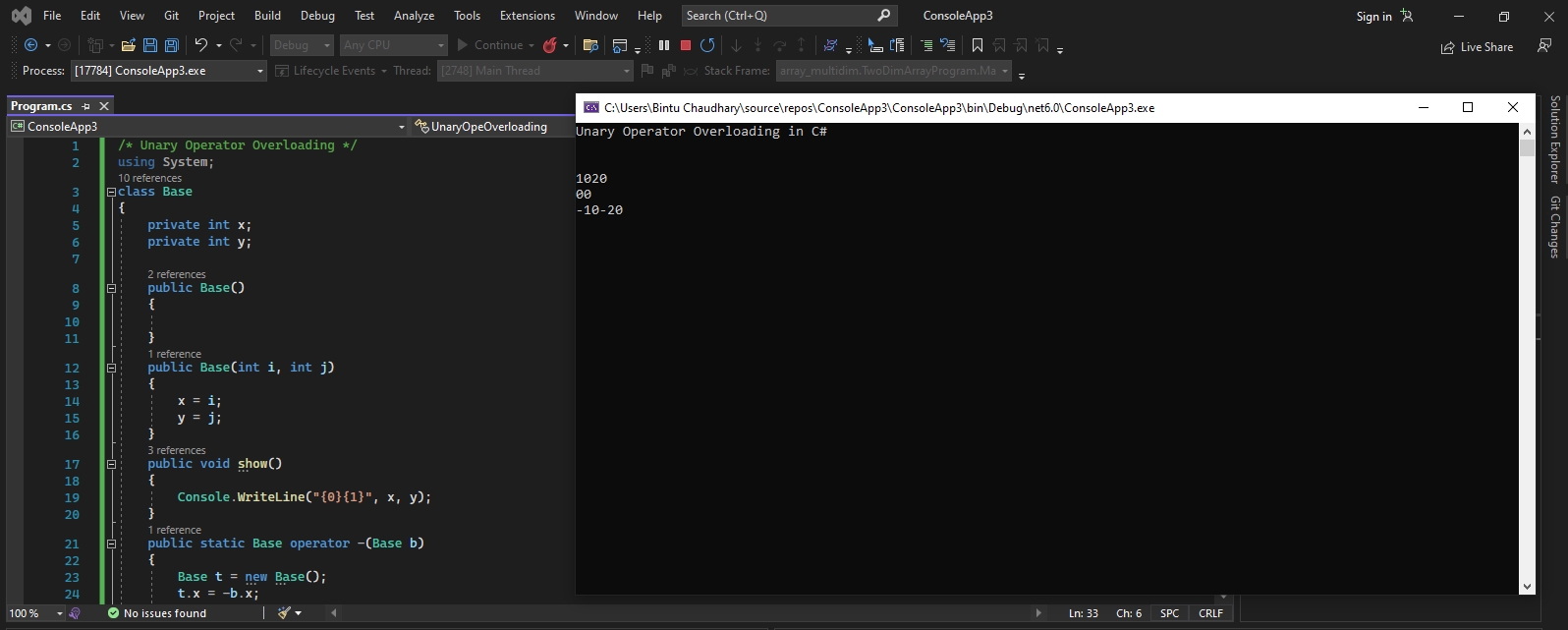
The following program overloads the unary (-) operator inside the Base class.


Output


Overloading Binary Operators

     An overloaded binary operator must take two arguments and at least one of them must be of the type class or struct, in which the operation in defined. But overloaded binary operators can return any value except the type void. The general form of an overloaded binary operator is as follows.

public static return_type operator op (Type t1, Type2 t2) { //Statement }

A concrete example is given below. This program overloads plus (+) operator to mean adding two complex numbers defined by class Base.

Output


Overloading Comparison Operators

     The binary operators such as ==,!=,< , > <=,>= can be overloaded only as pairs. Remember that when a binary arithmetic opeartor is overload, corresponding assignment operators also get overloaded automatically. For example if we overloaed + operator, it implicitly overloads the += operator also.


Rules of Operator Overloading

While Overloading an operator, the following rules must be kept in mind.
  1. The user defined operator declarations can't modify the syntax, precedence or associativity of an operator. For example, a + operator is always a binary operator having a predefined precedence and an associativity of left to right.

  2. User defined operator implementations are given preference over prefefined implementations.

  3. Operator overload methods can't return void.

  4. The operator overload methods can be overloaded just like any other methods in C#. The overloaded methods shoult differ in their type of arguments and/or number of arguments and/or order of arguments. Remember that in this case also the return type is not considered as part of the method signature.


Interfaces

By Bintu Chaudhary   Posted at  8:00:00 AM   Interfaces
Home  »  C#  »  Interfaces


     In object-oriented paradigm, multiple inheritance are most challening to implement. Interfaces allow multiple inheritances in C#.
   An interface defines a contract. A class or struct that implements an interface must adhere to its contract. An interface may inherit from multiple base interfaces, and a class or struct may implement multiple interfaces.
   Interface can contain methods, properties, events, and indexer. The interface itself does not provide implements for the members that it defines. The interface merely specifies the members that must be supplied by classes or struct that implement the interface.


Output

Polymorphism

By Bintu Chaudhary   Posted at  7:51:00 AM   Polymorphism
Home  »  C#  »  Polymorphism


     Originally polymorphism has been derived from two greek words poly which means many and morph which means forms. Thus stating multiforms or many faces.
   Hence polymorphism refers to the objects belonging to different classes responsd to the same function call but in different forms. For example, View function takes an argument and displays it on the screen.

  1. View("Welcome to my program");
  2. View(123.4);
  3. View(187524);

Therefore when the first method is called it will display Welcome to my program on the screen. When the second method is called by passing float argument it will display 123.4 and on the execution of the third method it will display 187524, which is an integer value.

  Overloading is the technique to implement the polymorphism.

Polymorphism and Virtual Methods

     A virtual method in C# specifies an implementaion of a method that can be polymorphically overridden derived method. A non-virtual method can't be polymorphically override in a Derived class. A virtual can be declared by using the keyword virtual as follows:


Output


Output

Inheritance

By Bintu Chaudhary   Posted at  5:45:00 AM   Method Overloading
Home  »  C#  »  Inheritance


     Inheritance means using the Pre-defined Code. This is very Main Feature of OOP With the advantage of Inheritance we can use any code that is previously created With the help of inheritance we uses the code that is previously Defined but always Remember We are only using that code but not Changing that code With the Advent of inheritance we able to use pre-defined code and also able to add new code. All the pre-defined code is reside into the form of classes if we wants to use that code then we have to inherit or extend that class The Class that is Pre-defined is called as Base or super Class and the class which uses that code is called as derived or sub class There many types of Inheritance provided by C# But Multiple Inheritance is not Provided by C#. Various types of inheritance provided by C# is as follows:

Contents

Hiding through Inheritance

     Name hiding through inheritance occurs when classes or structs redeclare names that were inherited from base classes. The type of name hiding takes one of the following forms.

  1. A constant, field, property, event, or type introduced in a class or struct hides all base class members with the same name.
  2. A method introduced in a class or struct hides all non-method base class members with the same name, and all base class methods with the same signature.
  3. An indexer introuced in a class or struct hides all base class indexers with the same signature (parameter count and types).
   Contrary to hiding a name from an outer scope, hiding an accessible name from an inherited scope causes a warning to be reported. In the example

Output


Inheritance and Constructors

     The constructors and destructors are not inherited to a derived class from a Base class. However when we crate an object of the derived class, the derived class constructor implicitly call the base default constructor. The following prgram show this.


Output


Containment Class

     With the Advent of C# we can Also Develop Also Some Another Form of Inheritance which is also known as the m Containment . Inheritance is Called as Containment when we are Declaring the Object of a class into another Class Then They have a Relationship Like house has a Room and Car has a Stereo etc.

Method Overriding

     In inheritance a user may have to face Problem about using the Same name Method in both the Classes like in Base and Derived Classes there is Same Name of a Class so that if we wants to Define a Method which is Similar to base class in a derived Class then we have to use two Keywords as Virtual and Override.

  The Method which is declared as Virtual in a base class , can only be Override by derived Class, if in the Derived Class uses Override Keyword along with the Name of Method which we wants to Defined Again. And if you wants to Access the Method of Base Class then we have to use the Base.


Constructors and Destructors

By Bintu Chaudhary   Posted at  5:41:00 AM   Destructor
Home  »  C#  »  Constructors and Destructors


     The accessing of various members/objects of the class comparison of class with structures and use of classes using special member function called Constructors and Destructors for initializing and disposing of objects belonging to that class.

Contents

Constructors

     Generally a Constructor is that which is used for initializing the data Members of a class and a Constructor is that whose name is Same as name of class and used for Initializing the data members of Class and it gets Automatically called when an object of class is created But Always Remember Some things about Constructor Like :-

  1. Name of Constructor must be same as name of class
  2. Have No Return Type Even Not Void
  3. Automatically Called when an object of class is created
  4. Used for Assigning Some Values for data Members or variables

There are four types of Constructor as follows:-
  1. Default Constructors
  2. Parameterized Constructors
  3. Copy Constructors
  4. Static Constructors

Default Constructor

     Default Constructor is also called as Empty Constructor which has no arguments and It is Automatically called when we creates the object of class but Remember name of Constructor is same as name of class When a user creates an object of class with the help of new operator then Constructor gets called.


Parameterized Constructor

     This is Another type Constructor which has some Arguments and same name as class name but it uses some Arguments So For this We have to create object of Class by passing some Arguments at the time of creating object with the name of class and The Name of Parameter also be unique Means that name will not be Used by anyone.


Copy Constructor

     This is also Another type of Constructor. In this Constructor object of another Constructor is passed As name Suggests you Copy means Copy values of another Class object This is used for Copying the values of class object into an another object of class So For Calling Copy Constructor We have to pass the name of object whose values we wants to Copying


Static Constructor

     As we Know that Constructor gets Automatically Called when an object of a Class is Created For this we must have to create an object so that Static Constructor is the Special type of Constructor which is used for Assigning values to data members and without Creating an Object a user can Access Data Member or Variable of Class. For Calling a data Member from a Class a user can just use the Name of Class and name of data Member directly.


Destructors

     As we know that Constructor is that which is used for Assigning Some Values to data Members and For Assigning Some Values this May also used Some Memory so that to free up the Memory which is Allocated by Constructor , destructor is used which gets Automatically Called at the End of Program and we doesn't have to Explicitly Call a Destructor and Destructor Cant be Parameterized or a Copy This can be only one Means Default Destructor which Have no Arguments. For Declaring a Destructor we have to use ~tiled Symbol in front of Destructor.


Constructor Overloading

When a Constructor has a Same Name but he has a different behaviors then this is called as the Constructor Overloading The Constructor Overloading is Occurred when :-
1) Name of Constructor is Same.
2) Different Number of Arguments Passed to Constructor.


Method Overloading

     Method Overloading is also Called as Function Overloading. Overloading Means a Functions has many Behaviors occurred When in class when a functions has same name but different behaviors A Functions said to be overloaded When For Calling a Method or a Function is Overloaded we have to Remember few things:-

1. Function has same Name but Different Return Type.
2. Difference in No of Arguments.
3. Different Return Type in Arguments.

When We Pass a Call for Execution then it will match the Criteria of Function Like Number of Arguments and Data types etc This is the Responsibly of Compiler to Find the Exact Match for Constructor and When a Compiler Finds More than One Match Then this will gives us an Error Message.

Static Members

     We know in Class data members and Members Functions are Instantiated, When Object of Class is Created New Memory is Allocated by Each Object .So for Avoiding this New Memory Each Time Creation We Uses Static Data then data will be Common to all and the static data is used without creating an object of class. Static data is used without creating an object Instead with name of class. The Members those are declared as Static are Known as Static Members are associated with the class itself rather than individual objects Main Advantage of Static variables is C# creates only one Copy of Static data Members in Memory Like Data Members Methods May also be Static and they Called without object of class Always Remember that Static data Members if are not Initialized then they have automatically initialize to Zero .

THIS Reference

     When a user have to face Problem to use same name of Variables in a class and Variables of Function or you can say that when a user wish to use Same name of Variable for Removing the Problem to Remember Names of Many Variables Then he May use THIS Keyword . THIS Reference is used for Specifying the Difference Between the Function Variables and Original Variables.

Read-Only Members

     We knows that data of Class is Accessed by Any user when they are declared as Public. But if we wants to Prevent the value of data Member of a Class or in other Words if we doesn't Want to Change the Value from outside the Main Then we can Declare a Data Member or a Variable as a Read-only in a Class . Once Declared as Read-only they we can't Make Changes into the Variable


Properties

     As we Know that Data Which is Private in a Class will not be Accessible from outside the Class then this Problem can be Solved with the Help of Property which is same as like a Friend Function as in C++ But in C# Properties are used for Specifying Values into the Private data and For Using or Making a Property a user have to use Set and get Keywords and also a value Keyword The Value Which is Assigned to a Property will be Given to that Private data Member and then we may Retrieve a Value from that Property.

Indexers

     Indexers are also Same as Properties but they are used for Specifying or to Set the Values or Private Data Members through an index Number when we are Indexer then we have to use the this Keyword and also we have to use set and get Keywords for Specifying the Value into the Private Variables As I an Saying that a user have to Specify the index also So for this a User have to use the Collection Element Either it May be a List or Either this May a Array List.


Classes and Objects

By Bintu Chaudhary   Posted at  5:37:00 AM   Objects
Home  »  C#  »  Classes and Objects


     C# is a Purely OOP Language Means C# is used for Creating Code which is used by another Users and A user has a Facility to use any data from that Existing Code A Language called as OOP Language if it supports all the Features of the OOP Language For Understanding OOP's first you have to understand few concepts:-


Contents

Principles of OOP

     In object-oriented palance, a problem is viewed in terms of the following concepts:

Objects

     An Object is a Real Word Thing Which performs a Specific Task and which has a set of Properties and Methods. Properties of Object are Also Called as Attributes of an Object and Method is also Known as the Function of the Object Like What an Object can do For Example A Car is an Object which has a Certain Number of Properties Like Color, Model No, Average etc and a Function Known as Run When A User gives Some Race then the Car Will be Moved

Classes

     A Class is that which contains the set of properties and Methods of an object in a single unit Like Animals is name of class which contains all the Properties and Methods of an Object of another Animals So if we wants to access any data from the Class then first we have to create the Object of a class Then we can use any data and method from class.

Data abstraction

     Data Abstraction is that in which A User Can use any of the data and Method from the Class Without knowing about how this is created So in other words we can say that A user can use all the Functions without Knowing about its detail For Example When a User gives Race to Car The Car will be Moved but a User doesn't know how its Engine Will Work

Data encapsulation

     Data Encapsulation is also Known as Data Hiding as we know with the inheritance concept of OOP's a user can use any code that is previously created but if a user wants to use that code then it is must that previously code must be Public as the name suggests public means for other peoples but if a code is Private then it will be known as Encapsulate and user will not be able to use that code So With the help of OPPS we can alter or change the code means we can make the Code as Private or public This allows us to make our code either as public or private

Inheritance

     Inheritance is very popular Concept in OOP This provides the Capability to a user to use the Predefined Code or the code that is not created by the user himself but if he may wants to use that code then he can use that code This is Called Inheritance but Always Remember in Inheritance a user only using the code but he will not be able to change the code that is previously created he can only use that code

Polymorphism

     Poly Means many and morphism means many function The Concepts Introduces in the form of Many behaviors of an object Like an Operator + is used for Addition of Two Numbers and + is also used for Joining two names The Polymorphism in java Introduces in the Form of Functions Overloading and in the Form of Constructor Overloading. For example considering the operator plus (+).
16 + 4 = 20
"abc" + "xyz" = abcxyz


Dynamic binding

     Binding refers to the linking of a procedure call to the code to be executed in response to the call. Dynamic binding means that the code associated with a given procedure call is not know until the time of call at run-time. This is associated with polymorphism and inheritance.

Message Passing

     Message passing is another feature of object-oriented programming. An object-oriented program consists of a set of objects that communicate with each other. The concept of message passing makes it eaiser to talk about building systems that directly model or simulate their real-world conuter-parts.


Defining a Class

     For Making a Class which is a user defined data type we have to use Keyword Class and We can also Create Variables in the Class those are called as instance variables and we can adds also some Methods in the Class . For Accessing Any Element form Class either he may a variable or a Member Function then first we have to Kept in Mind the Access Modifier Means the Access Modifier will Specify where you can Access a Variable or either a Method For Using anything from a Class first we have to create an object of Class with the Help of New Operator and then with the Help of object and dot Operator we can Access any data from the Class Suppose if a data isn't initialized then the data of the Class is set to Zero by default.

A Class Contains
1) Data Members or Simply Called As Variables
2) Member Functions or Simply Called as Functions

//Simple Class


New
New is a Keyword Which is used when we are Creating an object of class For Storing all the data like variables and member functions of class there is some memory Space that is to be needed So that With the help of new Keyword and Object is Instantiated or Simply an object Reserves Some Memory or Some New Memory is Allocated to Class Object For Storing data and member functions of Class So Every Object Must be Created With the Help of New Keyword So For Allocating New Memory Area.

Abstract Classes

     The abstract modifier is used to indicate that a class is incomplete and intended only to be a base class of other classes. An abstract class differs from a non-abstract class is the following ways:

  1. An abstract class cannot be instantiated directly, and it is an error to use the new operator on an abstract class. While it is possible to have variables and values whose compile-time types are abstract, such variables and values will necessarily either be null or contain references to instances of non-abstract classes derived from the abstract types.
  2. An abstract class is derived from an abstract class, the non-abstract class must include actual implementations of all inherited abstract members. Such implementations are provied by overriding the abstract members.


Abstract Classes & Method


Nested Class

     Classes are usually specified independently of each other. But it is possible for one class to be specified within another's specification. In this case, the latter class is termed a nested class.


Sealed Methods

     When an instance method declaration includes a sealed modifier, the method is said to be a sealed method. A sealed method overrides an inherited virtual method with the same signature. Whereas a virtual method declaration introduces a new method, an override method declaration specializes an existing inherited virtual method by providing a new implementation of the method. The sealed modifier can only be used in combination with the override modifier.


Structures and Enumerations

By Bintu Chaudhary   Posted at  5:29:00 AM   Structs
Home  »  C#  »  Structures and Enumerations


     A Structure is such a group of basic data type variables, which behaves as a unit. Moreover, it resembles another construct - class - a very important data type in object oriented programming.

Enumeration is yet another type of data structure that assigns integer values to string type data values. Both the data types are extensively used in C#.

Contents

Structure

     A Structure is a collection various variables with different variables like Int ,Float Char etc .The C# Language also provides us to create a data type which includes all the other data types of int , float and character The Main user defines data type is Structure Which Provides us the facility to make a data types which hold either the int value, float value of character values. Structure is the user defined data type which is used for creating a single Variable which makes us possible to declare a value either a int, float or character A user First Make a Structure of different data types with their respective variables A structures is like container which hold all the different variables with their different values and their different length.

Always Remember that the member of the Structure is always Accessed with the help of the (dot) . Operator or if we wants to access a variable of the structure then we must use the. (dot) Operator. The Member of the Structure are always Accessed through the Structure variables or For Accessing the Elements of the Structure First you have to create the instance of the Structure then with the help of the name of instance and dot Operator we can Access any variables from Structures for declaring the structure we can use this

struct stu
{
  char name[10],lastname[10];
  int age;
  float height;
}
Structure is also user defined data type but the Main difference between the Arrays and Structure is that All the Elements of An Array are of Same type but in Structure all the Elements of a Structure are of different data type.

A Structure May be Nested Means we can also define a Structure inside another Structure and Structure is a container of various Elements which have a different name and different data type.


What is Enumeration ?

     Enumerated data type is user defined data type and This is a Special data type which provides a user to opportunity to invent your own data type and define what values the variables of this data type can take Enumerated data type is used for crating a set of values of a date type and all the values of data type are start from 0 by default but a user and can change the value For Making this data type First we can declare the data type and specifies its possible values All the values are increment by 1 its previous value.

using System;
public class enumvariables
{
  public enum values
  {
    a,b,c,d;
  }
  public static void Main()
  {
    Console.WriteLine("Value of D: " +values.d);
  }
}

Output
Value of D: 3

Enumeration are a collection of item (variables). It holds by default values if we not assign a value variable hold 0 value second 1 value third 2 and so on. If we assign the third variables 10 values. It show the fourth variable by default 11 value assign.


Difference Between the Structure and Class

  1. All the Variables in the Structure are value type so that they are stored on the Stack in Memory and in Class Variables are of reference type so that they are stored on the heap of the Memory.
  2. Classes Support Inheritance but a Structure can't be inherited.
  3. Classes have both default and Parameters Constructor but a Structure have not a default Constructor.
  4. When we Assign the Class Variable then the Original Values are Copied but in the Structure only the Values are Copied it doesn't Passes the Original Reference for that Variables.


Structs with Methods

     A C# Struct can also contain methods. The methods can be either static or non-static. But static methods can access only other static members and they can't invoke by using an object of the structure. They can invoke only by using the struct name.

Output


Structs and Constructors

     A C# struct can declare constructor, but they must take parameters. A default constructor (constructor without any parameters) is always provided to initialize the struct fields to their default values. The parameterized constructors inside a struct can also be overload.


Output


Structs with Arguments


Output


Nested Structs

     We can declare nested structures i.e. structs inside other structs. Following code snippet illustrates this:


Output


Back to top ↑
Connect with Me