Advertisement

Showing posts with label Method Overloading. Show all posts

Inheritance

By Bintu Chaudhary   Posted at  5:45:00 AM   Method Overloading
Home  »  C#  »  Inheritance


     Inheritance means using the Pre-defined Code. This is very Main Feature of OOP With the advantage of Inheritance we can use any code that is previously created With the help of inheritance we uses the code that is previously Defined but always Remember We are only using that code but not Changing that code With the Advent of inheritance we able to use pre-defined code and also able to add new code. All the pre-defined code is reside into the form of classes if we wants to use that code then we have to inherit or extend that class The Class that is Pre-defined is called as Base or super Class and the class which uses that code is called as derived or sub class There many types of Inheritance provided by C# But Multiple Inheritance is not Provided by C#. Various types of inheritance provided by C# is as follows:

Contents

Hiding through Inheritance

     Name hiding through inheritance occurs when classes or structs redeclare names that were inherited from base classes. The type of name hiding takes one of the following forms.

  1. A constant, field, property, event, or type introduced in a class or struct hides all base class members with the same name.
  2. A method introduced in a class or struct hides all non-method base class members with the same name, and all base class methods with the same signature.
  3. An indexer introuced in a class or struct hides all base class indexers with the same signature (parameter count and types).
   Contrary to hiding a name from an outer scope, hiding an accessible name from an inherited scope causes a warning to be reported. In the example

Output


Inheritance and Constructors

     The constructors and destructors are not inherited to a derived class from a Base class. However when we crate an object of the derived class, the derived class constructor implicitly call the base default constructor. The following prgram show this.


Output


Containment Class

     With the Advent of C# we can Also Develop Also Some Another Form of Inheritance which is also known as the m Containment . Inheritance is Called as Containment when we are Declaring the Object of a class into another Class Then They have a Relationship Like house has a Room and Car has a Stereo etc.

Method Overriding

     In inheritance a user may have to face Problem about using the Same name Method in both the Classes like in Base and Derived Classes there is Same Name of a Class so that if we wants to Define a Method which is Similar to base class in a derived Class then we have to use two Keywords as Virtual and Override.

  The Method which is declared as Virtual in a base class , can only be Override by derived Class, if in the Derived Class uses Override Keyword along with the Name of Method which we wants to Defined Again. And if you wants to Access the Method of Base Class then we have to use the Base.


Methods in C#

By Bintu Chaudhary   Posted at  5:15:00 AM   Variable
Home  »  C#  »  Methods in C#


     A method is a member that implements a computation or action that can be performed by an object or class. Methods are just same Like a Function as we Make a Function we makes a Method but for Methods we doesn't worry about the Declaration or any Method so that we can use any Method without any declaration of Any Method For Declaring a Method we have to Specify :


Contents


Main Method

     The method with the name - Main - with upper case M, has a special significance. It is the entry point in any application. As such there must be at least one Main method in one class of the entire application. When an application is executed it is this method that gets the execution control automatically in the beginning.
Note that more than one class may have Main methods in an application. However, the programmer must specify which Main method is the entry point of application at the compile time failing which the compiler generates error message.

A Main method
public static void Main()
{
  //method body
}

A Main method taking command line arguments and returning no value.
public static void Main(string [] args)
{
  //method body
}


Invoking Methods

     A method, once declared in a class can be invoked (executed) on an object of that class as shown below:

public class abc
{
  public:
    void method1()
    {
    }
}

In this code snippet, a public class - abc - has been declared with a public method - method1 that takes no arguments and returns no value. This method can be invoked on an object of abc type as show below:

abc obj;
obj.method1();


Nesting of Methods

     A method is said to be nested, if it invokes other methods from within its definition. Consider the following program for illustration.


Output:


Pass By Value

     By default all the Methods are declared as value or when no parameter is Specified then all the variables are passed as value to Method Means The Formal Arguments doesn't Affect on the Actual values those are passed for Execution.Consider the following program for illustration.


Output


Reference Parameters

     C# Support provides the concept which is same like pointers means Reference As I Mention when the Arguments are Passed to a Method then the Actual Arguments are not affected But when we wants to Pass Actual Value or when we wants to Change the values of Parameters by formal Arguments then the Arguments Must be Passed by using ref Keyword which also Passes the Address upon Heap where the Actual value of a variable is stored.


Output


The Output Parameters

     These are Special Parameters and used when we wants to take input as a result which is Produced by another Expression and the Output Parameter When the value of Variable doesn't Specified and the value of variable is depend on the output of another variable . In the variable which we wants to declare as Output then the Corresponding variable of Method also Must have a output Declaration by using out Keyword.
    Out keyword is used for return a output not need to declare third variables.


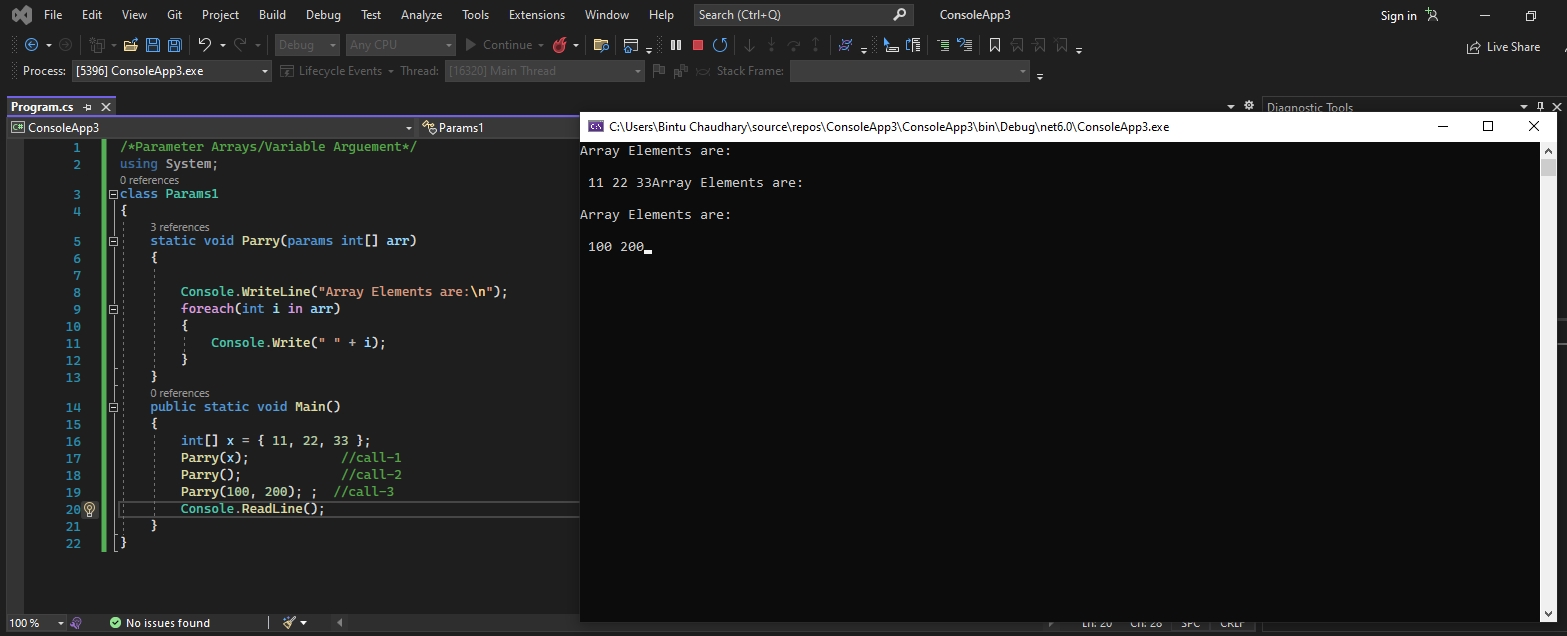
Parameter Arrays/Variable Arguement

     A parameter declared with a param modifier is a parameter array. If a formal parameter list includes a parameter array, it must be the last parameter in the list and it must be of a single-dimensional array type. For example, the type string[] and string[][] can be used as the type of a parameter array, but the type string[,] can not. It is not possible to combine the params modifier with the ref and out modifiers.


Output


Param Parameter

     As we know that in Method generally the Number of Arguments are fixed for Executing a Method but Some times there is a Situation when we doesn't know about the actual number of Arguments those may have Passed So in that situation the Argument must be declared by using the Params Keyword and any number of Arguments can be Passed to Method either a Zero or More Arguments.
    we pass the group of value when we use the param keyword.


Output


Method Overloading

     Method Overloading is also called as Function Overloading. Overloading Means a Functions or a Method has many Behaviors. Method Overloading occurred When in class when a functions has same name but different behaviors A Functions said to be overloaded When :-

1) Function has same Name but Different Return Type
2) Difference in Number of Arguments those might be Passed.
3) Difference in Return Type in Arguments.

When We Pass a Call for Execution then it will Match the Criteria of Function Like Number of Arguments and Data types etc The Compiler will finds for a Exact Match and when an Exact Match is Found then the Method will Executed and when a Compiler founds two Functions in a Match then this gives us an error Message.


Output


Method Overriding

     When an instance method declaration includes an override modifier, the methods is sait to be an override method.


Output


Back to top ↑
Connect with Me